
Wix merchant growth knowledge hub
Quantity breaks, fixed product bundles, and mix & match offers are all useful ways to increase average order value in Wix, but they are not interchangeable. A quantity break helps shoppers buy more units of the same product. A fixed product bundle helps shoppers buy a merchant-selected set of related products together. A mix & match offer lets shoppers build their own bundle from a selected group of products.
The easiest way to choose is to look at shopper intent. If the shopper might reasonably want more of the exact same item, use a quantity break. If the shopper needs a ready-made set, use a fixed product bundle. If the shopper wants flexibility and choice within one curated group, use mix & match.
For the full product page offer strategy, start with the Wix product bundles and quantity breaks guide.
Bundles supports all three offer types for Wix product pages: same-product quantity breaks, fixed product bundles, and mix & match offers. This article gives you a practical decision framework so each offer goes on the products where it actually makes sense.
Short answer: use quantity breaks when shoppers can buy more of the same item. Use fixed product bundles when you want to present a ready-made set of products that belong together. Use mix & match when shoppers should be able to choose their own combination from selected products.
Quantity breaks vs product bundles vs mix & match comparison
| Question | Quantity break | Fixed product bundle | Mix & match |
|---|---|---|---|
| What does the shopper buy? | More units of the same product | A merchant-selected set of related products | A shopper-selected bundle from an approved product group |
| Best buying moment | Stocking up, gifting multiples, repeat-use purchasing | Completing a routine, kit, gift set, or accessory set | Choosing favorites, building a custom set, or mixing products within one theme |
| Example | Buy 3 coffee bags, save 15% | Coffee + filters + mug, save 10% | Pick any 3 soaps, save 10% |
| AOV path | More units per order | More products per order through a curated set | More products per order through shopper choice |
| Best product fit | Consumables, basics, refills, giftable small items | Complementary products with a clear shared use case | Collections with variety, flavors, scents, colors, or interchangeable options |
| Main risk | Unrealistic quantities or weak margins | Random bundles that do not feel curated | Too many choices or weak bundle rules that confuse the shopper |
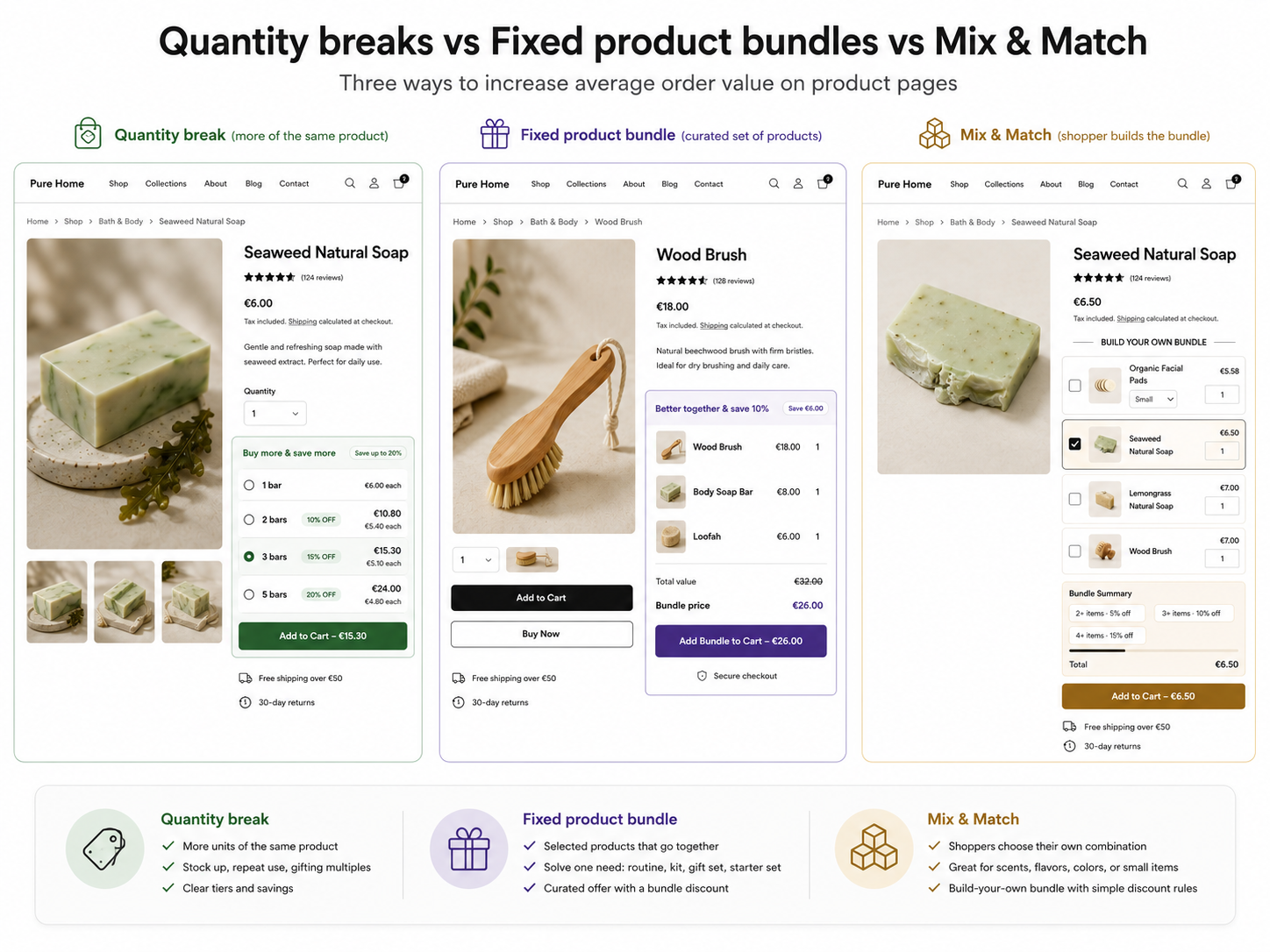
Use quantity breaks when shoppers can buy more of the same item
A quantity break is the right choice when the product already has repeat-use or multi-buy behavior. The shopper is deciding whether to buy one unit or several units of the same product.
Good examples include coffee, tea, soap, candles, socks, stationery, protein snacks, pet treats, refills, small gifts, and everyday basics. A quantity break keeps the offer simple: Buy 2, save 10%; Buy 3, save 15%; Buy 5, save 20%.
Coffee bag: use a quantity break when the shopper may want two or three bags of the same roast.
Candle multipack: use a quantity break when the shopper may buy several of the same scent for home, gifts, or events.
For a deeper guide to tiers, product fit, and mistakes, read the guide to Wix quantity breaks.
Use fixed product bundles when products answer one buying need together
A fixed product bundle is the better choice when the shopper needs multiple selected products to complete the purchase. The bundle should feel curated, not random.
This works well for routines, starter kits, gift sets, accessory sets, and complementary products. The merchant chooses the products included in the fixed bundle, and the shopper sees a ready-made offer.
Coffee starter kit: use a fixed bundle when the offer is coffee + filters + mug.
Candle gift set: use a fixed bundle when the offer is candle + matches + greeting card.
For product selection and pricing guidance, read the guide to fixed product bundles in Wix.
Use mix & match when shoppers should build their own bundle
Mix & match is the best choice when the shopper wants flexibility within a curated set of eligible products. Instead of accepting one ready-made bundle, they choose the items themselves.
This works especially well when products come in several scents, flavors, colors, or formats, and the shopper wants control over the final combination. The merchant still defines the rules, such as which products are eligible and what discount applies, but the shopper builds the bundle.
Soap bundle builder: let shoppers pick any 3 soaps from a selected collection and save 10%.
Snack box: let shoppers choose any 6 bars or treats from a curated range to create a custom multipack.
For more guidance, read the guide to Wix mix & match bundles.
Create all three offer types with Bundles.
Add quantity breaks, fixed product bundles, and mix & match offers to Wix product pages without custom code.
A simple decision checklist
Use this checklist before choosing the offer type for a product page.
- The shopper may want more of the exact same item.
- The product is replenishable, giftable, or easy to stock up on.
- The discount still protects margin after costs and shipping.
- The quantity tiers are realistic for the product price.
- The products naturally belong together.
- The set solves one buying need, routine, gift, or setup.
- The shopper benefits from a curated recommendation.
- Inventory is stable across all selected bundle products.
- The shopper should be able to choose their own combination.
- The products belong to one collection or theme.
- Variety improves the offer, such as scents, flavors, or colors.
- The bundle rules are simple and easy to understand.
Use more than one offer type across the store, but not everywhere
Many Wix merchants should use all three offer types across the store. That does not mean every product page needs all three. A coffee bag might use a quantity break, while a coffee starter kit page uses a fixed product bundle. A soap collection page may work better with mix & match so the shopper can choose their favorite combination.
Too many offers on one product page can create choice overload. If the shopper sees a coupon banner, a quantity break, a fixed bundle, a mix & match builder, a popup, and another promo message all at once, the page starts to feel noisy. Choose the offer that best matches the product and buying moment.
A helpful rollout is to map offer types by product category first. Replenishable products may get quantity breaks, routine-based or giftable products may get fixed bundles, and collection-style products may get mix & match. This keeps the strategy consistent without making every page look the same.
For more product and industry examples, use the Wix bundle offer ideas guide.
| Product situation | Recommended offer | Why |
|---|---|---|
| One popular coffee bag | Quantity break | Shoppers can stock up on the same product |
| Coffee starter kit | Fixed product bundle | Filters and mug support the main product |
| Build-your-own soap set | Mix & match | Shoppers may want to choose their own scents |
| Snack variety pack | Mix & match | Choice is part of the appeal of the purchase |
| Single candle scent | Quantity break | Multiples make sense for gifting or home use |
| Candle gift set | Fixed product bundle | The set creates a ready-to-give purchase |
| High-priced occasional decor item | Usually neither | Buying multiples may feel unrealistic and discounting may hurt margin |
Margin and inventory considerations
The best offer is not the one with the biggest discount. It is the one that can help shoppers choose a larger order while still making sense for the business.
For quantity breaks, look closely at unit cost, shipping weight, packaging, and how the discount changes profit per order. A Buy 5 tier can look attractive, but it may not work if shipping costs rise sharply or inventory is limited.
For fixed product bundles, check combined product cost, package size, fulfillment time, and whether each selected item is reliably in stock. One unstable product can make the whole bundle harder to maintain.
For mix & match, pay attention to how many products are eligible, how discounts scale, and whether inventory is deep enough across the full group. The offer should feel flexible without becoming operationally messy.
- Protect margin first. Higher AOV is useful only when the order remains profitable.
- Review inventory depth. Offers can move more units faster, especially on repeat-use or highly giftable products.
- Keep fulfillment simple. Bundles should not create avoidable picking, packing, or support issues.
- Test gradually. Start with a few high-fit products before rolling offers across the store.
When not to use any of these offer types
Sometimes the best decision is to skip product page offers entirely. If a product has low margin, limited stock, high shipping complexity, or weak product-market fit, a discount may only hide a deeper problem.
Avoid quantity breaks, fixed bundles, and mix & match when:
- The product is rarely purchased in multiples.
- The product is already priced tightly and does not have enough margin for a discount.
- Inventory is too limited to promote larger orders.
- The bundle products do not clearly belong together.
- The product group is too broad and makes the bundle feel confusing.
- The page already has too many competing promotions.
Put the decision before the widget
Use this comparison to decide which offer belongs on each product page before you build the widget.
Once the offer type is clear, the next practical step is placement: the Wix product page discount widget guide covers where the offer should appear, while the increase average order value in Wix guide helps you check whether the larger order still makes sense for margin.
Create all three offer types with Bundles.
Use quantity breaks for same-product volume discounts, fixed bundles for curated product sets, and mix & match for build-your-own bundle offers on Wix product pages.
FAQ: quantity breaks vs product bundles vs mix & match
Which is better: quantity breaks, fixed bundles, or mix & match?
None is always better. Quantity breaks work best when shoppers may buy more of the same item. Fixed product bundles work best when selected products solve one buying need together. Mix & match works best when shoppers should be able to build their own bundle from a curated set.
Can I use all three offer types in one Wix store?
Yes. Many stores can use quantity breaks for repeat-use products, fixed bundles for curated sets, and mix & match for choice-driven collections. The key is matching the offer type to each product page.
What is the difference between a fixed bundle and mix & match?
A fixed bundle is a ready-made set chosen by the merchant. Mix & match gives the shopper more control by letting them choose their own combination from selected products.
Should I use several offers on the same product page?
Sometimes, but not by default. Too many offers can make a page harder to understand. Start with the offer that best matches the product and shopper intent.
Do quantity breaks work for expensive products?
They can, but only when buying multiples feels realistic and the margin supports the discount. Many expensive occasional purchases are not good quantity break candidates.
What makes a fixed product bundle strong?
A strong fixed bundle combines selected products that clearly belong together, such as a routine, starter kit, gift set, or accessory set. The bundle should make the purchase easier to understand.
What makes a mix & match offer strong?
A strong mix & match offer gives shoppers meaningful choice without overwhelming them. The eligible products should fit one theme, and the discount rules should be simple and easy to follow.


